Reports, Upgraded: Deeper Insight Into How Subscribers Respond
Spot trends in how subscribers respond to your SMS and track form submission rates on your EveryAction, ActionKit and Action Network forms.
.svg)
Broadcast reports have always told you what happened, how many members were reached, how many replied, how many clicked. But the real power of SMS lives in the engagement it drives. What are members actually saying? How are they feeling? And when you share a form, who's just peeking, versus who's taking action?
We've shipped three major upgrades to Reports that answer exactly these questions, all designed to help your team move faster from insight to action.
Here's what's new.
1. Cluster Widget: Spot Trends in Incoming Messages
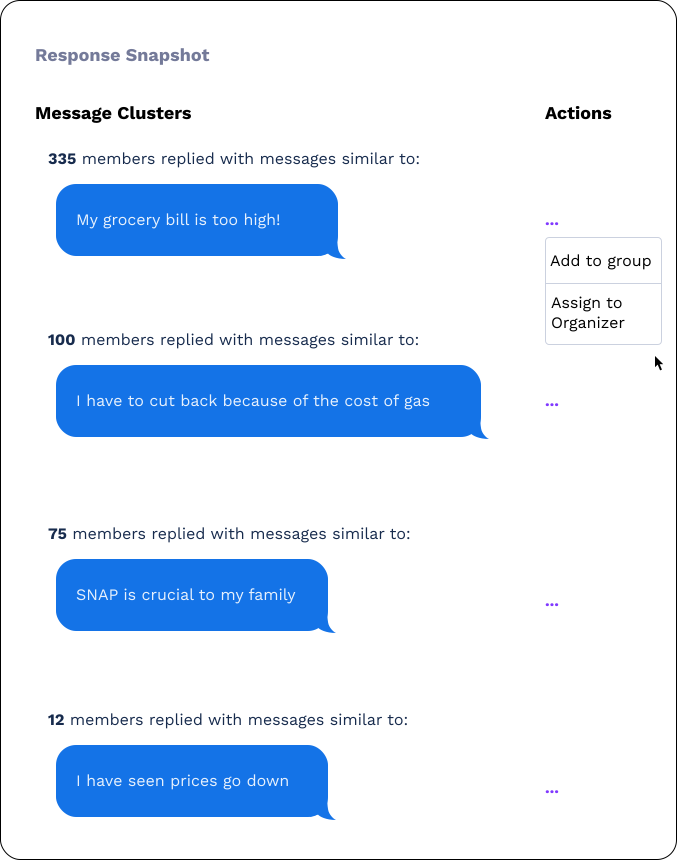
When thousands of members reply to a broadcast, eyeballing the Inbox for patterns can be time consuming. The new Cluster widget does the heavy lifting for you by grouping similar incoming messages together so you can see, at a glance, how your audience is responding.
Why it matters:
⁉️ The cluster widget unlocks the ability to ask open ended questions. Use subscriber responses to inform future broadcasts
🔮 Surface themes you'd otherwise miss, common questions, objections, excitement, concerns.
📢 Turn insight into action in one click: add a cluster of members to a group, or bulk assign them to an organizer in the Inbox for a personal follow-up.
If 400 members are asking the same question, you'll see that cluster at the top of your report, and you can route every one of them to the right organizer without scrolling through every conversation.
2. Sentiment Analysis: Better Visuals, Smarter Samples
Sentiment analysis has always given your campaign a read on how members feel about your messaging. Now the widget is significantly easier to read, and more useful day to day.
What's new:
👀 Improved data visualizations make it easy to see, at a glance, how your audience is responding.
💬 A refreshable sample of replies is paired with a sentiment score, so you can read real member language alongside the numbers.
✨ Hit refresh to pull a new sample any time, perfect for gut-checking trends or finding quotes for debriefs.

3. Form Submission Widget: Click-Through and Conversion
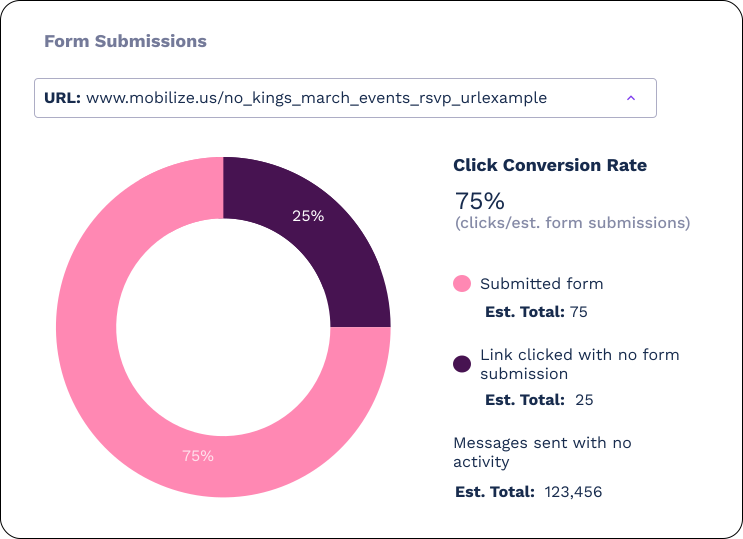
If you're sending ActionKit, Action Network, or EveryAction forms through Ascend, you already know clicks only tell half the story. The new Form Submission widget closes the loop.
What you'll see:
🔎 A visual breakdown of members who clicked your form versus members who clicked and submitted it.
🏆 A clear read on your true conversion rate, not just engagement.
📈 Data you can use to pressure-test your broadcast copy, and landing pages.
Why These Updates Matter
Each upgrade serves a different moment in the reporting workflow:
- Cluster widget helps you respond to what members are saying, fast.
- Sentiment analysis helps you understand how members are feeling.
- Form submission widget helps you measure what members are actually doing.
Together, they move Reports from a passive scoreboard to an active tool for sharpening every broadcast, flow, and form you send.
Try It Out
Head to your latest broadcast report to see the Cluster widget and updated Sentiment Analysis in action.
If your broadcast includes a trackable link to an ActionKit, Action Network, or EveryAction form select your form type in the Track click-throughs by type in the link shortener. The Form Submission widget will then automatically appear in your report.
As always, we'd love to hear what you think. Your feedback directly shapes what we build next.