Introducing Pick a Winner A/B Testing
Pick a Winner takes the guesswork out of A/B testing. Run a test on a subset of your audience, then let Ascend automatically send the best-performing message to everyone else.
.svg)
With the new Pick a Winner feature, you can run an A/B test on a subset of your audience, let the data determine which version performs best, and send the winner to everyone else, without ever leaving Ascend or manually re-broadcasting.
With Pick a Winner you configure everything upfront: your test variants, your winning metric, your test duration, and how the winner gets selected (manually or automatically).
How It Works
When you set up an A/B test broadcast, you'll now see the option to Run A/B test on a subset and pick a winner for the remaining audience.
To get started:
- Draft your variants. Write your version A and version B messages (or flows). You can test more than two versions — just hit the + icon to add more.
- Set your audience split. Decide what percentage of your audience receives the test, and what percentage is held back for the winning version.
- Choose your winning metric. Pick from click rate, response rate, or call rate. The version with the highest rate of the chosen metric will determine the winning version.
- Set your test duration. You can call the winner after a set number of hours (up to 72) or at a specific date and time. Give your audience enough time to engage before the winner is determined.
- Choose automatic or manual winner selection. Let Ascend pick the winner for you, or review the results yourself and send the winner with one click from the report.
Picking a winner with Automatic, Automatic Statistically Significant, or Manual
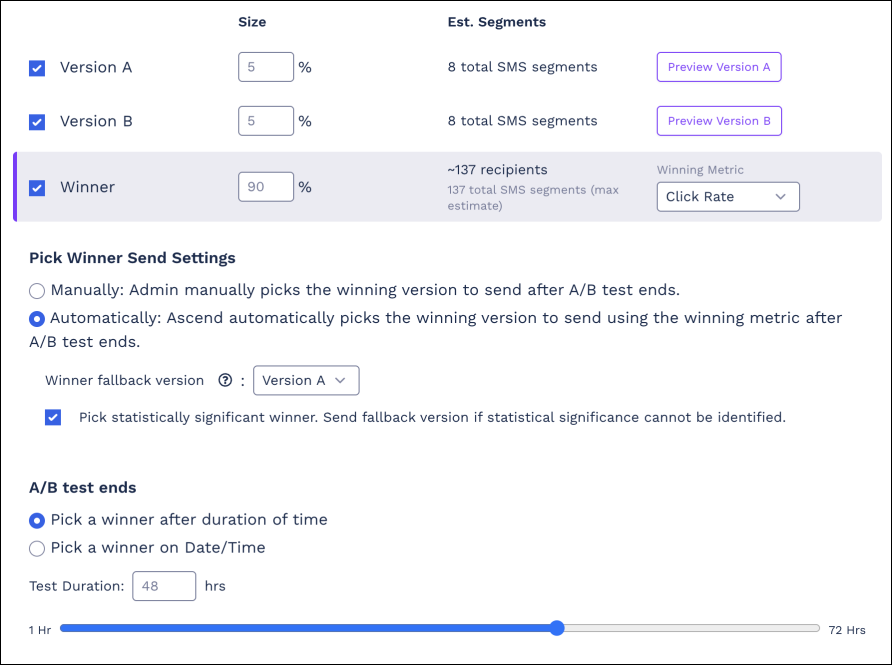
Pick a Winner gives you three ways to call the winning variant:
🤖 Automatic: Ascend picks the winner based on your chosen metric once the test duration ends. You'll also select a fallback version in case results are inconclusive.
🦾 Automatic (statistical significance): Ascend only calls a winner if the results reach statistical significance. If they don't, the fallback version is sent instead. This is the most rigorous option for teams that want to draw conclusions based on statistically significant evidence rather than anecdotal observations.
💪 Manual: Once the test runs, head to your A/B test report and click Pick as winner for the version you want to send. You can send it right away or schedule it for later. Quiet hours settings from the original broadcast are respected.
Tips:
- Scheduling works too. You can set up a scheduled A/B test with Pick a Winner. Configure everything in advance, and Ascend will run the test and send the winner automatically.
- Reports are your friend. Monitor test performance and winner results from the Broadcast Report Overview page, under the A/B test Report tab.
- Pick a Winner only needs to be configured once during broadcast setup. No need to revisit the broadcast after it's sent unless you're picking a winner manually.
Get Started
Ready to run your first Pick a Winner test? Head to the Broadcast page, toggle A/B Testing to ON, and look for the "Run A/B test on subset and pick a winner" option during the review step.